OpenLiteSpeed for cPanel and WHM
olscp replaces Apache with OpenLiteSpeed on a cPanel server. It reads your Apache configuration, accounts and .htaccess files, writes the OpenLiteSpeed configuration and keeps it in sync, while cPanel and WHM keep working as they do today.
Free and open source under GPL-3.0. For cPanel & WHM 11.130+ on AlmaLinux, Rocky Linux and CloudLinux 8 and 9.
AuthType Basic
AuthName "Members"
AuthUserFile /home/shop/.htpasswds/public_html/members/passwd
Require valid-user
Header set X-Frame-Options SAMEORIGIN
ExpiresActive On
ExpiresByType image/webp "access plus 1 month"
context /members/ {
  location       /home/shop/public_html/members/
  allowBrowse    1
  realm          olscp-4c2e91a07b13
  authName       Members
  required       valid-user
  extraHeaders   <<<END_extraHeaders
Header set X-Frame-Options SAMEORIGIN
END_extraHeaders
  enableExpires  1
  expiresByType  image/webp=A2592000
}
Managed from WHM
A WHM plugin shows the server state, LiteSpeed Cache, security and resource limits on one page. Switching between Apache and OpenLiteSpeed is one button.
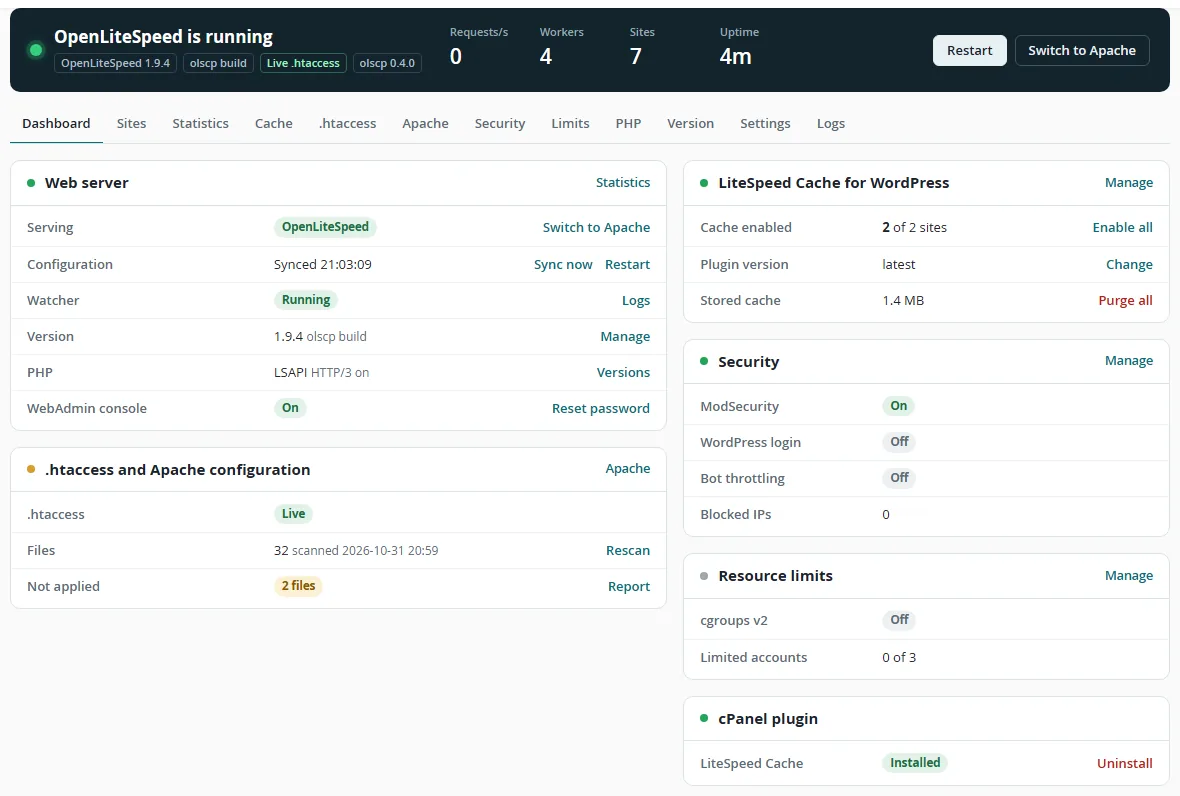
What olscp does
Everything a cPanel server expects from its web server, done by OpenLiteSpeed.
- Works with cPanel as it is
- Accounts, addon, sub and parked domains, AutoSSL, suspensions, MultiPHP,
restartsrv_httpdand EasyApache updates keep working. - Reads your Apache configuration
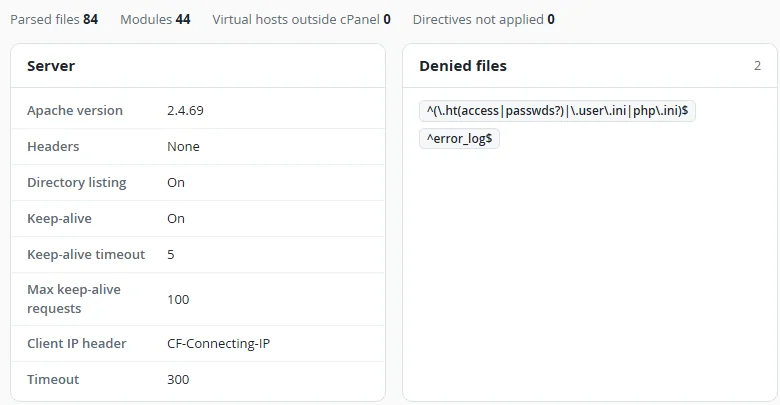
httpd.confand every include are parsed, so custom settings, protected files, aliases and extra virtual hosts carry over.- Understands .htaccess
- Rewrite rules, password protected directories, Require, Allow and Deny, headers, expires, redirects, error pages, MIME types and bot blocking with
SetEnvIf. - Applies .htaccess changes live
- With the olscp build of OpenLiteSpeed, edited rewrite rules take effect within a second, with no restart.
- PHP for every account
- cPanel PHP-FPM pools or LSAPI running as the account user. PHP processes survive restarts, so OPcache stays warm.
- LiteSpeed Cache for WordPress
- Cache storage per site, bulk enable from WHM and a cPanel plugin so customers can purge their own cache.
- Security built in
- ModSecurity with the cPanel and OWASP rule sets, WordPress login protection, bot rate limits and cgroups v2 limits per user or package.
- Easy to try, easy to undo
- Preview OpenLiteSpeed on ports 8080 and 8443 next to Apache. Going back to Apache is a single command.
How it works
olscp sits between cPanel and OpenLiteSpeed and does the translation Apache users would otherwise do by hand.
Read
cPanel account data,
httpd.confwith all includes and every.htaccessfile.Translate
Virtual hosts, SSL, PHP handlers, rewrite rules, access rules and cache storage are written as OpenLiteSpeed configuration.
Keep in sync
A watcher applies changes from cPanel, WHM and
.htaccesswithin seconds. cPanel's own restart tools now drive OpenLiteSpeed.
.htaccess changes without restarts
Stock OpenLiteSpeed loads .htaccess rewrite rules once. olscp ships a small GPL patch that checks each file at most once per second and reloads changed rules in place. Build it from WHM or with olscp ols build.
| Change | Official binary | olscp build |
|---|---|---|
Rewrite rules in .htaccess | Graceful restart, 2 to 5 seconds | Live within 1 second |
New .htaccess in any directory | Next scan or restart | Detected on the first request |
| Other directives, accounts, domains, SSL | Graceful restart, 2 to 5 seconds | Graceful restart, 2 to 5 seconds |
| PHP and OPcache during restarts | Kept running | Kept running |
Install OpenLiteSpeed on cPanel
The installer downloads OpenLiteSpeed from the official LiteSpeed repository and verifies its signature. Apache keeps serving your sites until you switch.
Install olscp
git clone https://github.com/NeuralFoundry/openlitespeed-cpanel.git
cd openlitespeed-cpanel
bash install.sh
Try it next to Apache
Optional. Your sites answer on ports 8080 and 8443 while Apache stays on 80 and 443.
olscp preview start
Switch
Open WHM > Plugins > OpenLiteSpeed and choose Switch to OpenLiteSpeed, or run the command below.
olscp disablebrings Apache back.olscp enable
Questions
Does OpenLiteSpeed work with cPanel?
OpenLiteSpeed has no official cPanel integration; LiteSpeed's cPanel plugin is made for LiteSpeed Enterprise. olscp connects OpenLiteSpeed to cPanel and WHM so accounts, domains, SSL certificates, PHP versions and cPanel's service tools keep working.
Is olscp free?
Yes. olscp is open source under GPL-3.0 and OpenLiteSpeed is free as well. No license key is needed.
Can I switch back to Apache?
Yes. Run olscp disable or use the Switch to Apache button in WHM. olscp does not change your Apache configuration, so Apache starts exactly as it was.
Are .htaccess files supported?
Yes. Rewrite rules, password protected directories, access rules, headers, expires, redirects, error pages, MIME types and SetEnvIf bot blocking are translated. With the olscp build, rewrite changes apply within a second without a restart.
Does LiteSpeed Cache for WordPress work?
Yes. The LSCache module is enabled with storage per site. WordPress sites can be found and cache enabled from WHM, and cPanel users get a plugin to purge their own cache.
Which systems are supported?
cPanel & WHM 11.130 or newer on AlmaLinux, Rocky Linux or CloudLinux 8 and 9, x86_64, with EasyApache 4 PHP versions.