OpenLiteSpeed for Windows
A native Windows build of the OpenLiteSpeed web server. It runs on Windows 10, Windows 11 and Windows Server without WSL, Docker or a virtual machine, serves PHP through LSAPI and installs on its own or inside Laragon and XAMPP.
Free and open source under GPL-3.0. OpenLiteSpeed 1.9.4 for x64 with PHP 8.2 to 8.5.
PS> .\OpenLiteSpeed-1.9.4-win64-setup.exe --silent --download-php 8.4
PS> C:\OpenLiteSpeed\bin\openlitespeed.exe -s status
running, pid 26392
HTTP/1.1 200 OK
x-powered-by: PHP/8.4.27
content-type: text/html; charset=UTF-8
server: LiteSpeed

<h1>Blog</h1><p>PHP 8.4.27 (litespeed) on Windows</p>
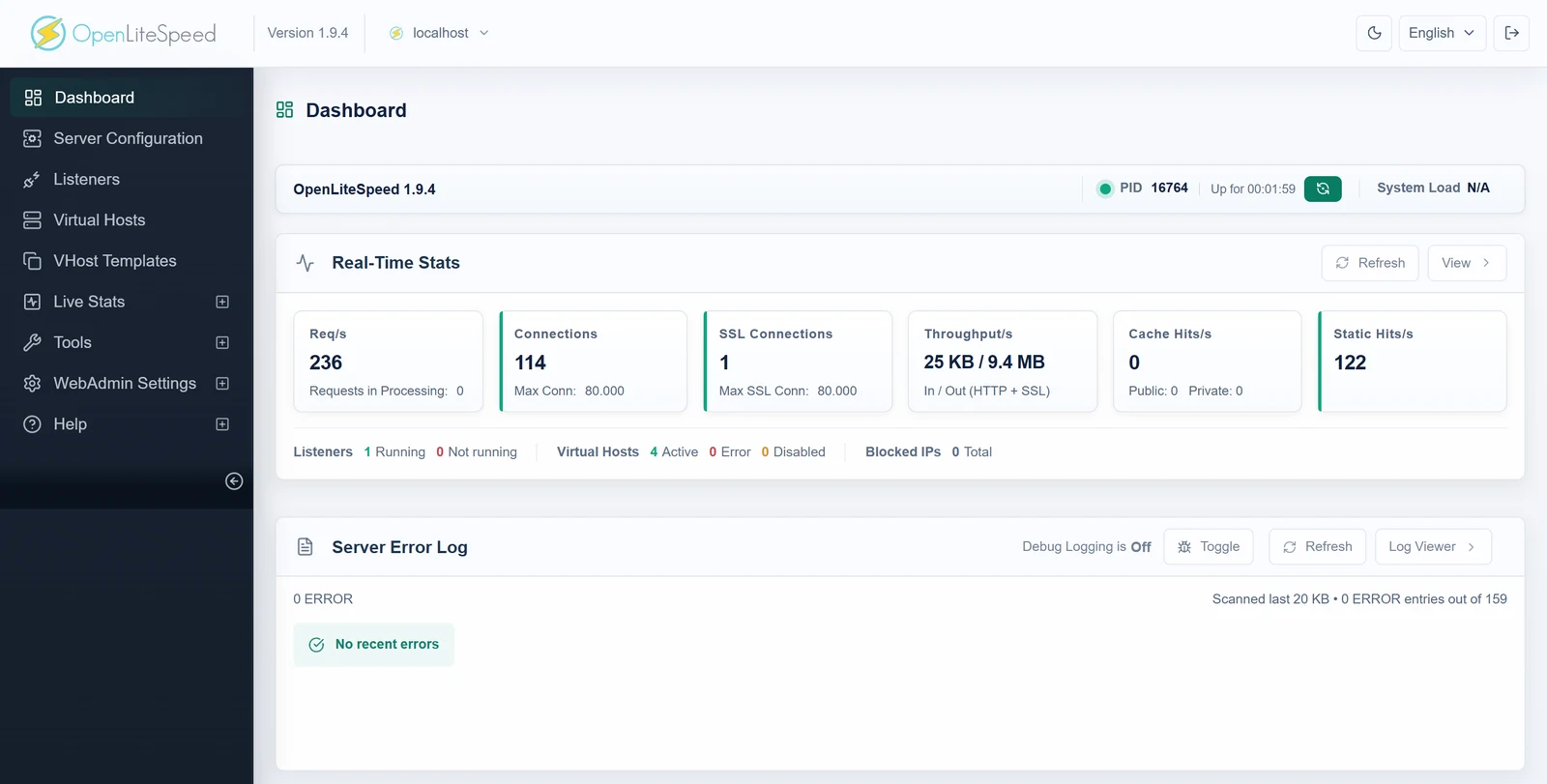
The full OpenLiteSpeed, on Windows
The same server and WebAdmin console as on Linux: virtual hosts, listeners, rewrite rules, LSCache and real-time statistics.
What you get
A web server for Windows that behaves like OpenLiteSpeed on Linux, with the tools Windows users expect.
- A native Windows program
- Built with Visual C++ on the Win32 API. No Cygwin, MSYS2, WSL, Docker or virtual machine in between.
- Every CPU core
- One HTTP worker per core, up to 32, all serving the same ports. A worker that crashes is restarted automatically.
- Fast PHP with LSAPI
lsphp.exefor PHP 8.2 to 8.5 runs on the official Windows PHP builds, so your extensions andphp.inikeep working. FastCGI is the fallback.- Laragon and XAMPP
- Setup finds them and their PHP versions, installs OpenLiteSpeed inside and serves the same project folders.
- A site for every folder
- Each folder in the projects folder becomes
http://folder.test/, and the hosts file is kept up to date. - Modern protocols
- HTTP/2, HTTP/3 over QUIC, TLS 1.3, Brotli compression and the LSCache page cache.
- Service or tray app
- Run as a Windows service that starts at boot under a restricted account, or from the tray icon with start, stop, PHP switch and logs.
- Reload without downtime
- Configuration changes apply with a graceful restart. Open connections finish on the old processes, new ones go to the new.
One installer for every setup
setup.exe detects installed PHP versions, Laragon and XAMPP and picks the folders for you. Running it again upgrades an existing installation and keeps its configuration.
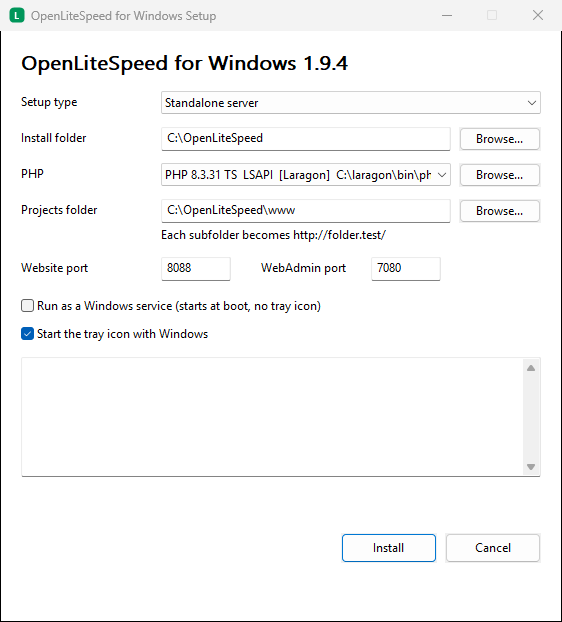
- Standalone server
- Installs to
C:\OpenLiteSpeedand serves the projects inC:\OpenLiteSpeed\www. Starts from the tray app or as a Windows service. - Inside Laragon
- Installs to
C:\laragon\bin\openlitespeed, serves the Laragon document root with the PHP version selected in Laragon and starts with Start All. - Inside XAMPP
- Installs to
C:\xampp\openlitespeedand servesC:\xampp\htdocswith the PHP that comes with XAMPP.
Built for multi-core servers
Windows has no fork and no SO_REUSEPORT, so OpenLiteSpeed for Windows shares its listening sockets between processes in its own way.
Listen
The main process opens the ports, loads the configuration and serves WebAdmin and HTTP/3.
Share
It starts one copy of itself per CPU core and hands each copy the listening sockets.
Serve
Every worker accepts connections and has its own PHP pool. Set the number of workers from 1 to 32 in WebAdmin.
The details are in How OpenLiteSpeed runs on Windows.
openlitespeed.exe       main, worker 1, WebAdmin, HTTP/3
 ├─ openlitespeed.exe    worker 2
 ├─ openlitespeed.exe    worker 3 to 8
 ├─ lsphp.exe            PHP pool of worker 1
 └─ lsphp.exe            one pool per worker
Install OpenLiteSpeed on Windows
The installer is a single file of about 5 MB with OpenLiteSpeed, lsphp.exe for every PHP version and the tray app.
Download
Get
OpenLiteSpeed-1.9.4-win64-setup.exefrom the latest release.Run setup
Check the setup type and PHP version it suggests and click Install. Note the WebAdmin password shown at the end.
Open your site
Visit
http://localhost/, or port 8088 when port 80 is in use. WebAdmin is athttps://localhost:7080/.
Unattended installation
OpenLiteSpeed-1.9.4-win64-setup.exe --silent --mode standalone --download-php 8.4 --service
Command line
Everything the tray app does is also available from bin\openlitespeed.exe in the install folder.
| Command | What it does |
|---|---|
-s start|stop|restart|reload|status | Controls the server. reload is a restart without downtime. |
--install-service, --uninstall-service | Registers or removes the Windows service |
--set-php <folder> | Switches to another PHP version, with LSAPI when it loads and FastCGI otherwise |
--dev-sites <folder> [tld] | Creates a site for every subfolder |
--dev-hosts, --dev-hosts-clear | Adds or removes the site names in the hosts file |
--admin-password <file> <password> | Sets the WebAdmin password |
Questions
Is there an official OpenLiteSpeed for Windows?
No. LiteSpeed Technologies builds OpenLiteSpeed for Linux. OpenLiteSpeed for Windows is an independent native port of OpenLiteSpeed 1.9.4, with the complete source code on GitHub.
Does it need WSL, Docker or a virtual machine?
No. openlitespeed.exe is a Windows program built with Visual C++. It uses the Windows network stack, file system and services directly.
Which PHP versions work?
PHP 8.2, 8.3, 8.4 and 8.5 for Windows, x64, thread safe or non thread safe. PHP runs through LSAPI with the included lsphp.exe, or through FastCGI with php-cgi.exe. The installer can download PHP from windows.php.net.
Can I use it with Laragon or XAMPP?
Yes. Setup finds Laragon and XAMPP, installs OpenLiteSpeed inside them and serves the same project folders with their PHP. In Laragon, Start All starts OpenLiteSpeed as well.
Can it run production websites?
It runs as a Windows service under a restricted virtual account, restarts after a crash, uses every CPU core and reloads its configuration without dropping connections. Test your application on it before you switch, as with any web server change.
Do .htaccess files work?
OpenLiteSpeed reads rewrite rules from .htaccess files, which covers WordPress, Laravel and most PHP applications. Other Apache directives in .htaccess are not applied.
How do I uninstall it?
Use Settings > Apps in Windows, or run uninstall.exe in the install folder. The service, the tray app and the hosts file entries are removed as well.